
Architecture diagram
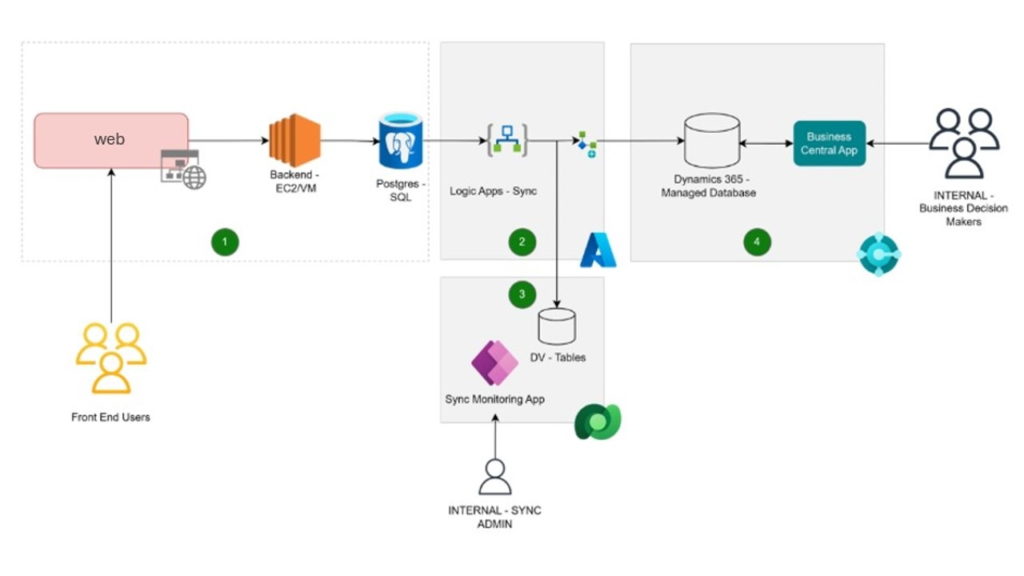
Workflow
The workflow collects reseller details, purchase orders, and product data via the frontend website into a PostgreSQL database, then triggers a Logic App every 5 minutes (or event-driven) to UPSERT this data into Dynamics 365 Business Central’s relevant tables Workflow Steps Collection: Frontend captures reseller company info, POs, products into PostgreSQL. Sync: Logic App performs scheduled (5-min) or event-driven UPSERT to D365 BC tables. Admins can monitor the sync process history through an Application to review Logs or open a specific run.
Components
- Website Public: The public website is built on top of a PostgreSQL database hosted in Azure. This database contains all the relevant information that needs to be synchronized with Dynamics 365 Business Central.
- Azure Logic Apps – sync: An Azure Logic App is responsible for orchestrating the synchronization process. It can be triggered either by an event (e.g., a new record is added to the database) or on a scheduled basis (e.g., every hour). The Logic App retrieves data from the PostgreSQL database, transforms it as needed, and then updates or creates corresponding records in Dynamics 365 Business Central using its APIs.
- Power Platform – Synchronization Monitoring app: A Model-Driven Power App serves as a monitoring dashboard for the synchronization process. It provides IT administrators with real-time insights into the status of sync jobs, including any errors or failures. Admins can also use this app to manually trigger syncs or re-trigger failed syncs.
- Dynamics 365 Business Central: This is the target system where the synchronized data from the website is stored and managed. It is a fully managed SaaS solution operated by Microsoft, and it serves as the central hub for business operations. The synchronization process ensures that the data in Business Central is always up-to-date with the latest information from the website.
Scenario details
The synchronization process is designed to ensure that data from the website’s PostgreSQL database is accurately and efficiently transferred to Dynamics 365 Business Central. The Azure Logic App will handle the data retrieval, transformation, and synchronization tasks, while the Power Platform app will provide visibility and control over the synchronization process for IT administrators. This architecture allows for real-time or scheduled synchronization, ensuring that Business Central always has the most up-to-date information from the website.
Considerations
- Data Volume: The synchronization solution has being designed to handle certain volume of data without performance degradation. If heavy usage of website is identified in the future, batching or throttling mechanisms might be required.
- Error Handling: Robust error handling and retry mechanisms have been implemented in the Logic App to ensure that transient failures do not result in data loss. The monitoring app provides clear visibility into any errors that occur during synchronization.